AI Automation for Small Businesses: 5-Question Test to Spot Real Solutions vs. Hype
Executive Summary
Problem Definition: Client Data Safety in the Age of AI
AI automation is helping me save hours each week in my small business and law practice. But with new tools come real concerns about AI data security and client confidentiality. I realized that free chatbots or public AI platforms often store and reuse inputs for model training which could expose sensitive client information.
The challenge I faced was: How can I use AI to reduce my admin costs and improve efficiency without risking client data breaches or non-compliance?
Evidence and Market Analysis: The Risks and Rewards
Reports from the Wall Street Journal show AI adoption rising across small businesses, and I’ve noticed data-related incidents are also rising. Legal and finance professionals on Reddit and industry forums share similar concerns about data leaving jurisdictional boundaries. Experts agree: the technology itself isn’t unsafe, it’s how it’s used. The real task for me was finding secure AI automation tools that respect confidentiality, comply with regional laws, and integrate seamlessly into trusted legal software.
Solution Framework: How to Safeguard Client Data with AI
Security begins with smart selection. I choose AI tools built with enterprise-grade protection:
Data encryption at rest and in transit
Private, regional storage (for example, servers based in Canada)
Enterprise or business accounts that disable data use for AI training
Integration with trusted legal software such as Clio, PC Law, or Cosmolex
This ensures my data remains securely within my legal environment, not in a public AI pool.
Implementation Roadmap: Using AI Safely and Compliantly
I believe AI can be as safe as cloud email or document storage if I use it with boundaries.
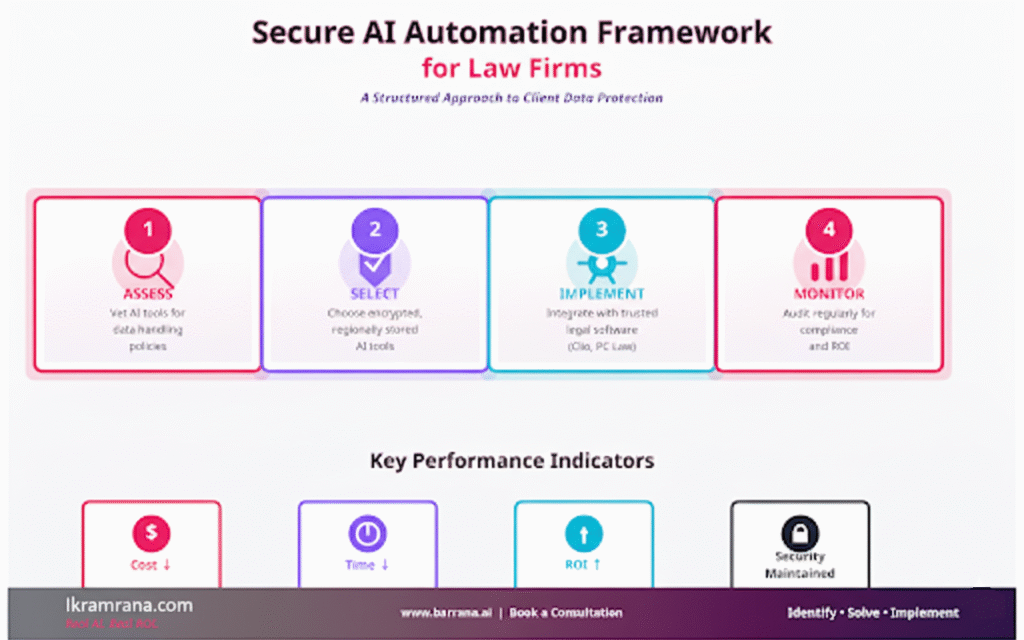
Step 1: I vet carefully. I audit every AI tool’s data-handling policy before onboarding.
Step 2: I define internal usage rules. I make sure my staff understand what can and cannot be shared with AI systems.
Step 3: I monitor and audit regularly. I schedule quarterly checks to review activity logs and ensure compliance.
When implemented this way, AI automation becomes my trusted assistant, not a compliance risk.
KPI Tracking Checklist
I use these key indicators to measure both performance and security:
Cost Reduction: Track savings from reduced manual data handling
Time Savings: Measure hours reclaimed from repetitive admin tasks
Revenue Growth: Monitor the impact of faster workflows and client onboarding
Process Efficiency: Assess accuracy, turnaround time, and workflow consistency
- Your Next Step
Let's Build Your Advantage
If you are ready to move beyond discussion and start implementing intelligent solutions that deliver a measurable impact, let's talk. I am selective about the projects I take on, focusing on partnerships where I can create significant, lasting value.
FAQs
Typically, firms see measurable ROI through reduced labor hours, faster document prep, and improved client communication.
Most secure AI tools can be set up in under four weeks once data boundaries are defined.
Resistance to change, data security fears, and lack of staff training are the most frequent.
Start with repetitive, low-risk tasks: document drafting, scheduling, intake forms, and follow-up reminders.
Track improved turnaround times, fewer manual errors, and positive client feedback.
Conclusion
AI automation doesn’t have to mean giving up control over my data. By choosing the right tools, setting clear internal policies, and monitoring usage, I can enjoy the efficiency of automation while protecting every client’s confidentiality.
ikramrana.com is where I document how I adopt AI safely, with clear governance and measurable ROI.